Eyes Up – Training Beyond the Screen
Training for the moments that happen outside the gym.
Eyes Up is a multisensory training experience that combines movement, cognition and digital interaction.
Using programmable light pods, sound and a companion interface, we explored how cognitive-motor training could become more intuitive, adaptable and connected to situations people actually encounter in everyday life.
Instead of designing another fitness app, we asked a broader question:
How might we turn abstract reaction training into an experience that helps people feel more confident in everyday movement?
The result is a training concept in which the interface does not become the experience itself.
It orchestrates what happens away from the screen.
The Challenge
Reactive training systems such as BlazePods already combine physical movement with visual stimuli. But our initial research revealed a gap between reacting quickly to coloured lights and practising the complex situations people encounter outside a training environment.
Walking through a crowd, stepping onto a bus, reaching for something on a shelf or stopping at a crossing require more than movement alone. They involve perception, decision-making, balance, attention and reaction — often simultaneously.
For older participants in particular, the challenge therefore wasn't simply how to make reaction training more engaging.
It became:
How can a digital training system translate everyday situations into safe, understandable and progressively challenging interactions?
Moving While Thinking
We began by understanding how the BlazePods behave, how exercises are configured and how trainers currently use them, and analysed how interfaces across fitness, rehabilitation and exergaming communicate instructions, difficulty and feedback.
One principle quickly became important.
The most interesting exercises weren't those that simply added a cognitive task on top of movement. We wanted the decision itself to become part of the movement.
That shifted the project away from reaction speed and towards perceiving, deciding and acting as one continuous interaction.
Conversations with a sports scientist and a game designer sharpened the brief for the interface: trainers need to adapt exercises without rebuilding them, and feedback, difficulty and timing have to work together for the experience to feel meaningful.
From Stop & Go to Everyday Situations
We explored very different directions: obstacle-based exercises, memory games, language tasks and spatial navigation.
One concept became particularly useful: Stop & Go. A green signal meant move. A red signal meant stop.
The metaphor immediately connected the training environment to something familiar — navigating traffic. From there, the idea evolved into a larger interaction language built around everyday situations.
Instead of asking participants to remember arbitrary rules, movements could represent recognisable actions:
Waiting at a crossing
Walking & stopping
Entering a bus
Raising the leg
Reaching a supermarket shelf
Stretching
Picking up dropped keys
Bending
Navigating a crowd
Upper-body twist
These scenarios became the conceptual bridge between what happens in the training room and what the participant wants to be able to do outside it.
Designing an Interaction Language
We wanted participants to understand the system without constantly looking at a phone, so the experience communicates through several channels at once:
Light → Sound → Movement → Touch
Colours represent actions. Sounds reinforce their meaning. The participant performs the movement and physically touches a pod to complete the interaction.
That final touch became an important design decision.
Earlier concepts didn't require participants to touch the pods, which meant the system couldn't reliably know whether an action had actually been completed. By making touch the end of each interaction, the physical movement gained a clear digital state:
Prompt → Movement → Confirmation → Next action
This seemingly small change made the physical and digital parts of the system behave like one interface.
Progressive Complexity
One of our biggest challenges was balancing challenge and overload.
Rather than exposing participants to every movement and signal at once, Eyes Up introduces complexity gradually. Early levels focus on basic movement and stopping; later stages add lifting a leg, stretching, bending and rotating the upper body.
Difficulty became not a simple easy / medium / hard setting, but something composed of multiple variables:
Reaction time · Movement · Number of rules · Distractions · Sensory cues
The goal was to keep participants challenged without reaching a point where complexity causes them to freeze.
Designing Beyond Visual Feedback
Because the participant's attention should stay in the room rather than on a display, sound became part of the interaction design — a second information channel alongside light.
Each movement got a sound tied to the situation it represents: traffic signals, vehicles, falling keys, public transport. Where a sound proved too ambiguous in practice, it was replaced.
Sounds are introduced in the tutorial before they appear in an exercise, so participants learn the interaction language before they have to react to it.
The Interface Behind the Experience
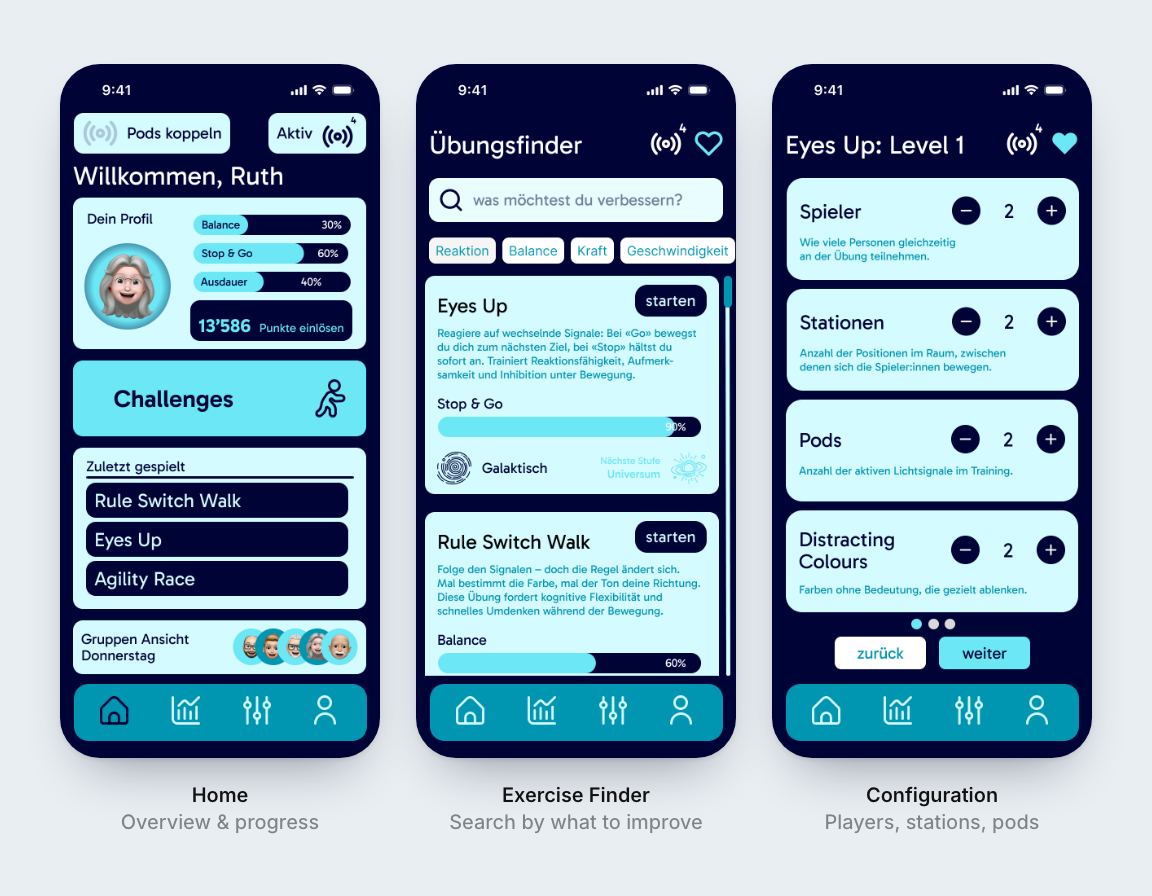
While participants interact mainly with the physical environment, trainers need a very different interface. They need to find an appropriate exercise, understand the connected hardware, configure difficulty, start the session, intervene when necessary and review progress afterwards.
Our first sketches exposed almost every parameter individually. It was flexible — but too complex.
Through several iterations, we reorganised the interface around the actual training journey:
Choose → Configure → Prepare → Train → Review
Home
Overview, recommendations and current progress.
Exercise Finder
Find exercises through relevant everyday situations.
Exercise Detail
Understand the movement, its purpose and its difficulty.
Configuration
Adapt difficulty, speed, signals and additional rules.
Tutorial / Ready
Learn the interaction before training starts.
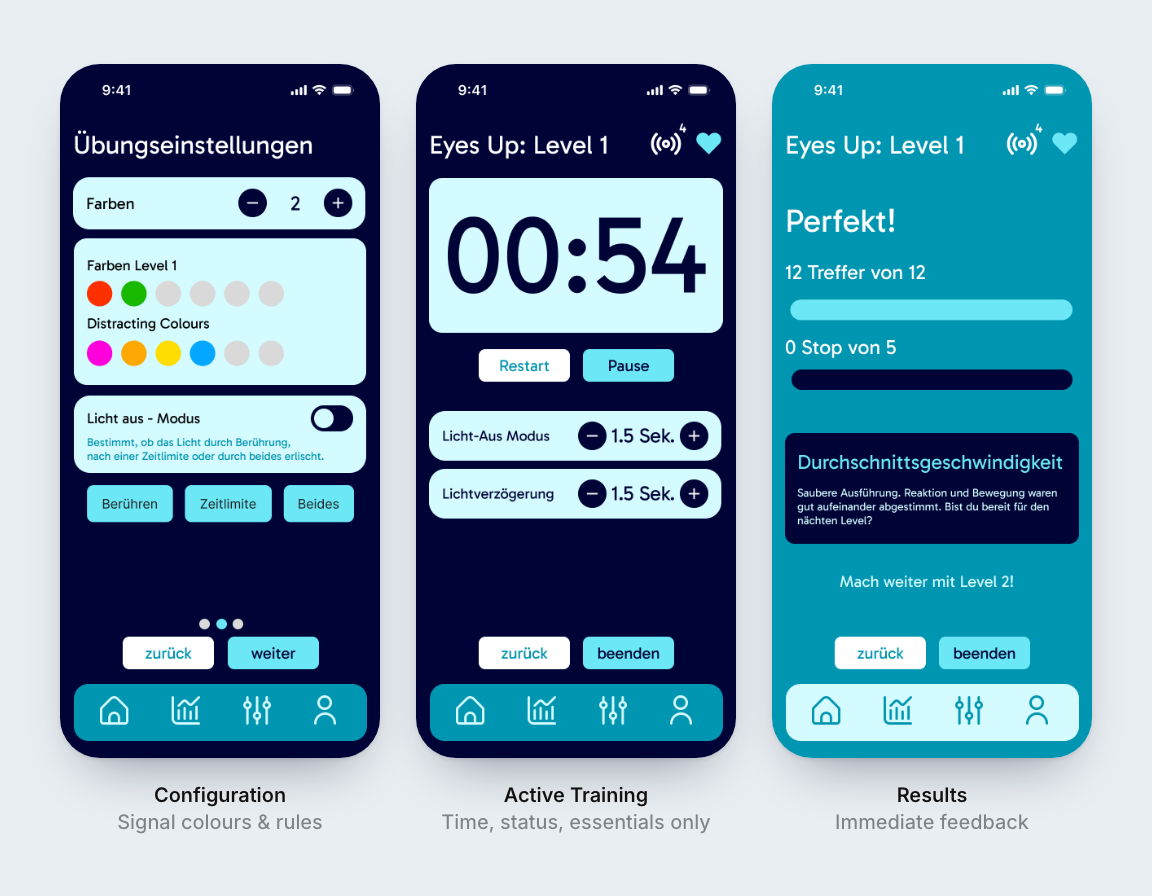
Active Training
Reduced live status and essential controls only.
Results
Immediate feedback and progress.
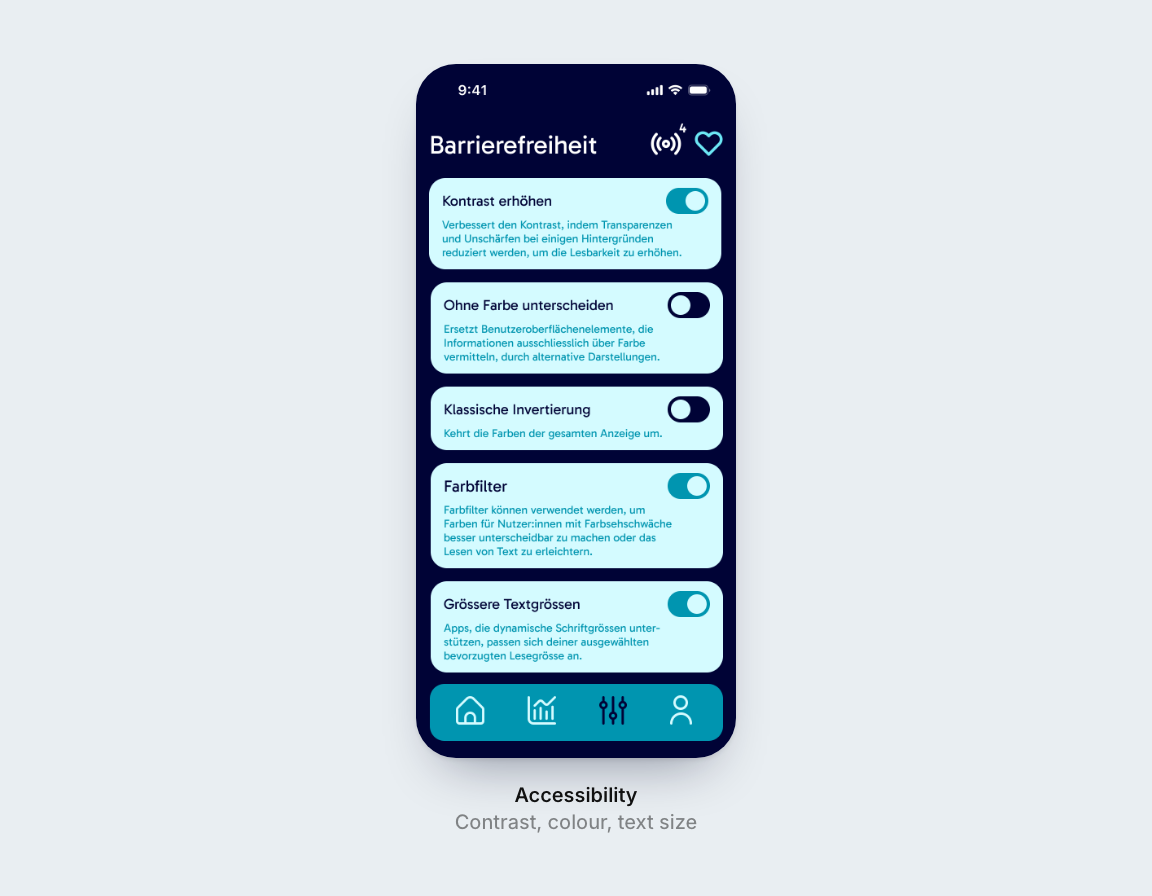
Settings
Accessibility, sound, contrast and global preferences.
Designing the Active State
The key UI decision was separating preparation from execution.
Everything that requires thought — choosing, configuring, learning the rules — happens before the session starts. Once training begins, the interface steps back: only time, level and status remain visible, alongside the controls a trainer needs to intervene.
The participant's attention belongs to the room, not the phone.
From Exercises to Everyday Goals
One of the most important changes came during our review.
Initially, exercises were organised around training categories such as reaction, balance or strength. But that's how the system understands training — not necessarily how someone understands their goal.
We therefore reversed the hierarchy:
Everyday situation → Training goal → Suitable exercise → Difficulty
Instead of asking "Which reaction exercise should I choose?", the interface can begin with "I want to feel more confident getting onto a bus."
This became one of the strongest UX principles of the project:
Organise the system around the outcome that matters to the person, not around the internal structure of the technology.
Designing for Different Abilities
Accessibility wasn't treated as a separate mode.
Visual and auditory signals create redundant feedback channels. Tutorials introduce interaction rules before an exercise begins. Difficulty can be adapted gradually, and the active interface intentionally removes unnecessary information. We also questioned colour contrast, font sizes and whether instructions shown during an exercise could add cognitive load.
Accessibility in Eyes Up isn't about adding assistance after the interaction has been designed. It changes how the interaction is designed in the first place.
Testing the Interaction, Not Just the Screens
Because Eyes Up exists between software and physical movement, a clickable Figma prototype alone wasn't enough. We tested exercises physically — adjusting pod arrangements, timings and touch interactions.
Some interaction ideas that looked logical on paper failed as soon as someone had to move through them. Sideways movement felt unnatural. Certain colour combinations were difficult to distinguish. Some sequences became too fast for older participants.
Each test changed the interaction model — and with it, what the interface needed to let trainers adjust.
For embodied interactions, the body is part of the prototype.
The Final Concept
Eyes Up became more than an exercise controlled by an app. It is a small ecosystem connecting three layers:
Physical
Movement, space and BlazePods create the interaction.
Sensory
Light and sound communicate what should happen and provide feedback.
Digital
The interface helps trainers select, configure, adapt and evaluate the experience.
Together, these layers turn a technical reaction-training system into an experience built around orientation, confidence and everyday movement.
The technology stays in the background. The goal isn't to become better at using BlazePods.
It's to become more confident when the pods are no longer there.
My Role
Eyes Up was a team project with Siri Dettwiler and Nora Holm, developed in Praxisprojekt 2 of the Interaction Design programme.
My work covered interaction design, UI design, research, prototyping and testing: shaping the light, sound, movement and touch language, structuring the trainer journey, designing the interface from paper prototypes to high-fidelity screens in Figma, and testing the exercises physically with the pods.
What I Learned
Eyes Up changed how I think about interfaces.
An interface doesn't have to be a screen. A colour can be an interface. A sound can communicate state. A physical movement can become an input. And touching an object can be the equivalent of pressing Confirm.
More importantly, I learned how quickly assumptions change once an interaction leaves Figma and meets a real person, a real room and a moving body.
The strongest moments in the project weren't created by adding more features. They came from repeatedly asking:
What does the person actually need to perceive, understand and do at this exact moment?
That is a question I want to carry into future interaction and design-engineering work.